As a faculty member, you might have the need to provide a link for
your students, through email or Blackboard, to an article in one of the
library's subscription databases. Since the databases are not open
access and require authentication to use, you must supply not only the
link to the article but must also add a prefix to the link. This prefix
allows access to the article either on or off campus *(see copyright note below).
The prefix you must use is: http://libproxy.bellarmine.edu/login?url=
The first example below is for an article in the Project Muse database.
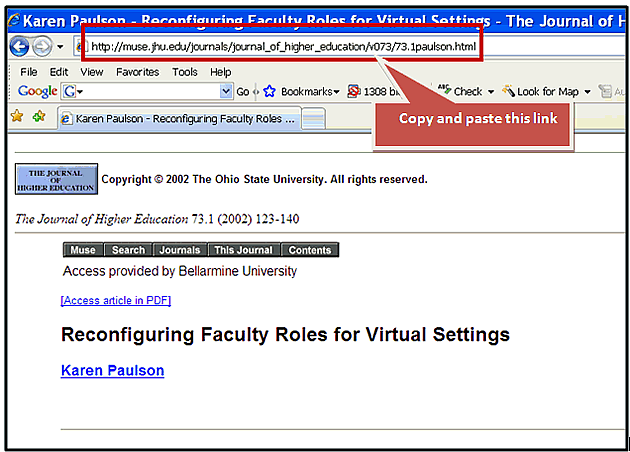
To put it all together, take the persistent link you copied from the above record: http://muse.jhu.edu/journals/journal_of_higher_education/v073/73.1paulson.html
Preceded by the proxy server link: http://libproxy.bellarmine.edu/login?url=
The resulting link will be: http://libproxy.bellarmine.edu/login?url=http://muse.jhu.edu/journals/journal_of_higher_education/v073/73.1paulson.html
This link will allow students to access the article directly from on or off campus.
*Copyright Note:
A link must be used instead of copying the PDF file into Blackboard
or email. There is no copyright concern since we do have a license to
use the databases by linking.
Questions: Contact the Library Reference Desk at 502.272.8317